Feature Export
Batch loading
from pybvh import read_bvh_directory, batch_to_numpy

clips = read_bvh_directory("dataset/", parallel=True)
data = batch_to_numpy(clips, representation="6d", pad=True)  # (B, F_max, D)
Supported representations: "euler", "quat", "6d", "axisangle", "rotmat".
When pad=False (the default), batch_to_numpy returns a list of arrays with different frame counts. When pad=True, it zero-pads to the longest clip. Then it returns a single (B, F_max, D) array.
For datasets with occasional corrupt files, pass skip_errors=True. Then read_bvh_directory emits a UserWarning for each failing load. It skips that file. A failing load does not crash the whole call.
Harmonizing datasets
Clips from heterogeneous sources typically differ in skeleton topology, frame rate, up-axis convention, and per-joint Euler order. Unify all of them in one call before batching:
from pybvh import batch

reference = pybvh.read_bvh_file("reference_skeleton.bvh")
clips = batch.harmonize(
    raw_clips,
    reference=reference,             # retarget all clips to this skeleton's bone offsets
    target_fps=30.0,                 # resample via SLERP when fps differs by > 0.01
    target_world_up="+z",            # rotate into a common up axis
    target_euler_order="XYZ",        # re-express joint angles in a uniform Euler order
    on_incompatible="drop",          # or "raise" for strict mode
    verbose=True,                    # one summary UserWarning at end of call when drops occur
)
Any of reference / target_fps / target_world_up / target_rest_up / target_rest_forward / target_euler_order can be None to skip that stage. Stages run in the order topology-gate → retarget → resample → world_up → rest_up → rest_forward → euler_order. on_incompatible picks what happens to clips that fail the topology gate against reference:
- They are dropped, with a single summary
UserWarningat the end of the call. - Or they raise
ValueError.
Pass return_report=True to get a JSON-serializable HarmonizeReport. It describes every transformation applied to every kept clip:
clips, report = batch.harmonize(raw_clips, reference=reference,
                                target_fps=30.0, return_report=True)

# Audit trail
print(f"Kept {len(report.kept_indices)} / dropped {len(report.dropped_indices)}")
for src, stages in zip(report.kept_sources, report.applied_stages):
    print(src, stages)  # e.g. ('/data/clip_0001.bvh', {'resample': '24→30'})

# Embed alongside the preprocessed dataset
import json, dataclasses
metadata = json.dumps(dataclasses.asdict(report))
Checking compatibility
For ad-hoc filtering without invoking harmonize, pybvh exposes three predicates on Bvh:
a.matches_hierarchy(b)is true when joint names, parent structure, and rest offsets match (withinatol). To ignore bone proportions, passmatch_offsets=False, for example when retargeting is about to overwrite them. Use this gate when you batch to rotation-invariant representations ('6d','quat','rotmat'), where channel layout is irrelevant.a.matches_channels(b)is true when the per-joint Euler rotation orders and the root position-channel order match. Use it in addition tomatches_hierarchywhen you batch to'euler'or'axisangle', where the channel layout depends on the source Euler order.a.matches_topology(b)is the conjunction of both. Use it when every aspect must align.
batch_to_numpy picks the right predicate automatically, from the requested representation. When a clip diverges from the reference, it emits actionable error messages (with source_path where available).
Motion features
Each feature captures a different aspect of the motion. Choose based on what your model needs:
vel = bvh.joint_velocities()        # (F, J, 3) in units/second (non-end-site joints)
acc = bvh.joint_accelerations()     # (F, J, 3)
ang_vel = bvh.angular_velocities()  # (F, J, 3) in radians/second

# Per-node variants include end sites — useful for extremity tracking
vel_all = bvh.node_velocities()     # (F, N, 3) — joints + end sites
acc_all = bvh.node_accelerations()  # (F, N, 3)

traj = bvh.root_trajectory()             # (F, 4) ground pos + heading

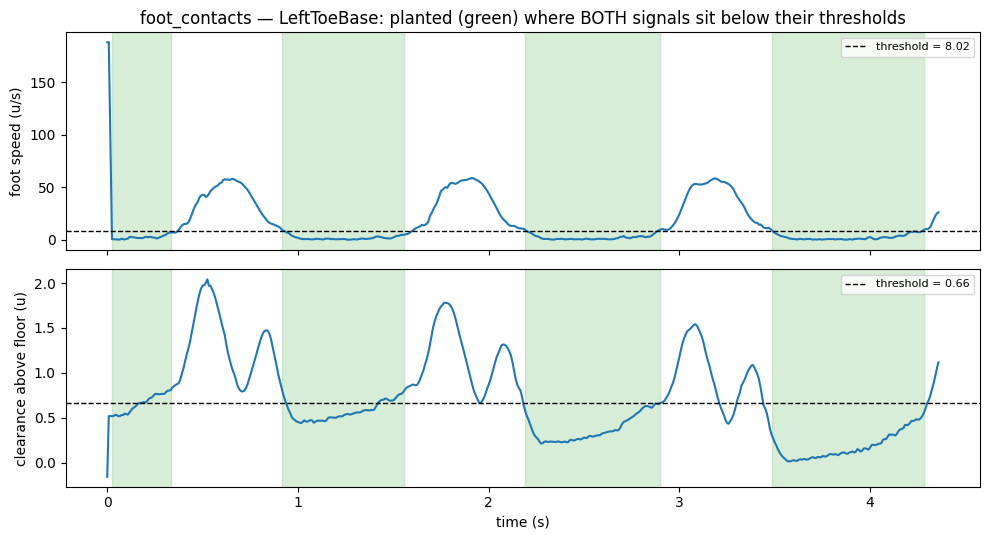
contacts = bvh.foot_contacts()  # (F, num_feet) binary labels
On the velocity-like functions, the defaults are stencil="central", pad="edge". They give central differences at interior frames and one-sided differences at the boundaries. The output shape equals the input shape. For strict forward differences that match pre-v3 pybvh ((F-1, ...) / (F-2, ...)), pass stencil="forward", pad="none". stencil="central", pad="none" drops both boundaries symmetrically.
| Feature | What it captures | Common use |
|---|---|---|
| Joint velocities | How fast each joint moves in 3D space (finite differences of FK positions) | Motion dynamics, action recognition |
| Joint accelerations | Rate of velocity change per joint | Smoothness constraints, jerk detection |
| Angular velocities | Per-joint rotation speed via rotation matrix log map | Rotation dynamics, independent of skeleton scale |
| Root trajectory | Ground-plane position (2D) of the body anchor + heading as sin/cos (2D) | Locomotion conditioning, path prediction |
| Foot contacts | Binary per-frame indicators (combined velocity + height by default; see method=) |
Contact-aware generation, foot skating loss |
The figure shows what the contact detector actually thresholds: foot speed and clearance above the floor, ANDed. The green spans are the detected stance:
For positions relative to the body anchor (the hips on most rigs), use bvh.node_positions(centered='anchor').
One-stop feature export
to_feature_array() combines rotations, velocities, and foot contacts into a single flat array:
features = bvh.to_feature_array(
    representation="6d",
    include_velocities=True,
    include_foot_contacts=True,
)  # (F, D) flat array under default stencil="central", pad="edge"
bvh.feature_array_layout(...) gives {block_name: slice}. Use it to unpack the flat array back into root_pos / rotations / velocities / foot_contacts blocks. The figure shows the column layout of the exact call above:
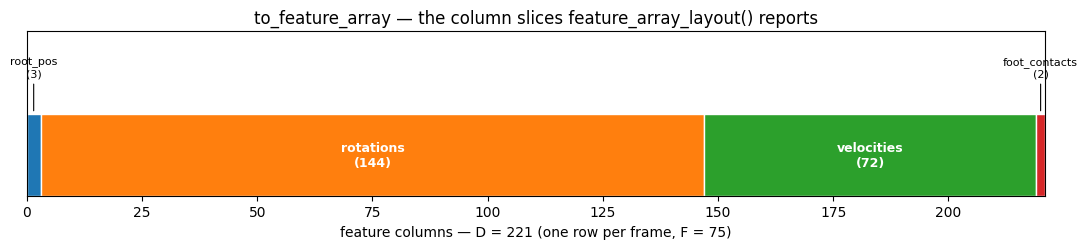
The root_pos block is the root's row of bvh.node_positions(centered=...). With the rotations (and the joint_translations block on a rig with translating joints), it gives back node_positions(centered=...) by forward kinematics. On a clip whose root lies above the body, such as a reference root above the hips, the block is the root's position relative to the body anchor: under centered="anchor" it is not zero, and under centered="first_ground" and centered="anchor_ground" it is the root's centred row, not the anchor's. For the body's travel, add the joint_translations block or use bvh.root_trajectory().
A clip with translating joints (joints other than the root that declare position channels) holds their per-frame positions in bvh.joint_translations. The feature array leaves them out by default. Pass include_joint_translations=True to to_feature_array, feature_array_layout and batch_to_numpy to add them as a joint_translations block of 3 * P columns after root_pos. With the block on, batch_to_numpy requires every clip to have the same translating joints.
Normalization
Per-channel z-score normalization (dataset mean/std statistics, apply, reverse) is an ML-pipeline concern. It moved to pybvh-ml in v0.8.0:
The functions behave exactly as they did in pybvh.batch. The stats dict (mean, std, constant_channels) and the z-score math are the same.
Skeleton metadata
Useful for graph-based models (GCNs, attention masks):
bvh.euler_orders   # ['ZYX', 'ZYX', ...] per joint
bvh.edges          # [(1, 0), (2, 1), ...] for GCN adjacency
bvh.joint_names    # ['Hips', 'Spine', ...]
bvh.joint_count    # 24
For full ML workflows
pybvh-ml provides tensor packing (CTV/TVC layouts), PyTorch Datasets, augmentation pipelines, and preprocessing to HDF5/npz.
See also
Gallery — foot contacts, root_trajectory, and the feature-array layout drawn (section 5) · Features API and Batch API — full signatures · Choosing a Representation — which rotation block to export