World Up and Orientation
What is world_up?
BVH files don't declare which axis is "up". Different software uses different conventions: Y-up is standard in game engines and Maya, Z-up in Blender and CAD tools. pybvh needs to know the up axis for:
- Visualization -- camera orientation, bounding box projection
- Foot contact detection -- which direction is "ground"
rotate_vertical()-- which axis to rotate aroundroot_trajectory()-- projecting the root path onto the ground plane
Auto-detection
Bvh.__init__ eagerly infers world_up by checking which axis the head is above the hips in frame 0. If frame 0 isn't informative (ambiguous axis dominance, missing joints), it falls back to rest-pose topology (bone offsets from Hips toward Head/Neck/Spine). The result is a signed axis string like '+y' or '+z'.
The disagreement warning
Some BVH files author the rest pose in one convention and animate in another. For example, a Blender export where the rest pose skeleton points along Y but the animation plays in Z-up world space. When this happens, pybvh emits a UserWarning and trusts the animation data (frame 0) over the rest pose.
This affects roughly 5% of files in the wild. If you see the warning, check whether world_up matches your expectation and override manually if needed.
Manual override
Validated input -- only accepts {+x, -x, +y, -y, +z, -z}. Anything else raises ValueError.
The override propagates through copy(), frame slicing (bvh[a:b]), mirror(), scale(), rotate_vertical(), translate_root(), and extract_joints(). Assign "auto" (or None) to clear the override and return to auto-detection. retarget() re-infers from the new skeleton. Note that BVH files have no world-up field, so manual overrides are lost on write/read round trips and must be re-applied.
forward_at(frame)
Returns the character's world-space facing direction at a given frame as a signed axis string:
bvh.forward_at(0) # '-z' (facing direction at frame 0)
bvh.forward_at(60) # '+x' (character has turned by frame 60)
Derived from actual joint positions: L/R joint pairs are averaged in world space to find the lateral axis, then crossed with world_up to produce the forward vector. This tracks the character's real facing as they rotate through the animation, not just rest-pose topology.
Used internally by bvhplot's camera auto-orientation and follow mode.
forward_at() reads the L/R pair list from bvh.lr_mapping. If your skeleton's joint names don't follow the expected conventions (Left*/Right*, .L/.R, _l/_r, mixamorig: namespace, .001 numbered duplicates), bvh.lr_mapping will be None, and forward_at() falls back to an arbitrary horizontal axis. To get a meaningful forward, set the mapping explicitly — see the Augmentation guide for the override patterns.
left_at(frame)
Returns the character's world-space leftward direction at a given frame as a signed axis string:
Together with world_up and forward_at(frame), left_at(frame) completes the character's local frame as an orthonormal right-hand-rule triple:
Positive step along left_at moves from the character's right side toward their left (right-shoulder → left-shoulder direction). This matches the standard rigging convention used in Blender, Maya, and Unity.
The triple drawn on a pose:
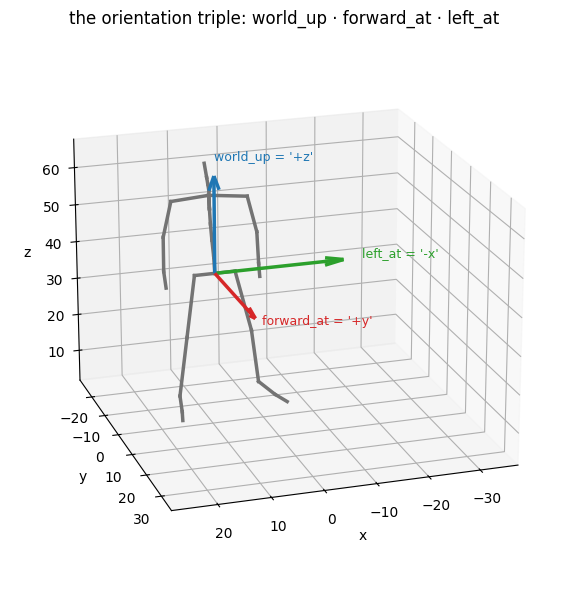
left_at() shares the L/R pair machinery with forward_at(), so the same bvh.lr_mapping caveats apply.
coords= (skip per-call FK)
Both forward_at() and left_at() accept a pre-computed (F, N, 3) spatial-coordinates array via coords= to skip the per-call forward kinematics. Useful when you need orientation axes across many frames:
coords = bvh.node_positions() # one FK pass
forwards = [bvh.forward_at(f, coords=coords) for f in range(bvh.frame_count)]
lefts = [bvh.left_at(f, coords=coords) for f in range(bvh.frame_count)]
facing_frame() — the continuous basis
forward_at() / left_at() snap the facing direction to the nearest of the six signed world axes — useful for canonicalization checks, but lossy: through a gentle turn the label stays constant while the true facing rotates. bvh.facing_frame() returns the same construction before the snap, as a FacingFrame(forward, left, up, valid) named tuple: three (F, 3) unit-vector arrays — a per-frame orthonormal right-handed basis (forward × left = up) — plus a (F,) bool array that is False on frames whose basis is the constant fallback rather than a measurement:
frame = bvh.facing_frame() # or bvh.facing_frame(coords=coords)
frame.forward[120] # continuous facing vector at frame 120
frame.valid[120] # False if that vector is the fallback
This is a yaw-only, gravity-aligned facing frame: up is always exactly world_up, so the basis only rotates about the vertical — it is deliberately not a pelvis orientation (no roll/pitch), and distinct from root_trajectory()'s heading, which is a second facing estimate built differently (the root bone's rotation applied to the rest forward — it inherits pelvis twist and is not a direction of travel). Frames with no usable L/R direction fall back to the same chain as forward_at() and are flagged in valid; see analysis.facing_frame for the full policy.
Rest-pose axes: rest_up and rest_forward
world_up and forward_at(frame) are animation-derived — they read the actual joint positions at playback time. rest_up and rest_forward are topology-derived — they read only the rest-pose offsets, independent of any animation data:
bvh.rest_up # '+y' — skeleton's topological up axis
bvh.rest_forward # '+z' — skeleton's topological forward axis
On a clean BVH file, rest_up == world_up and rest_forward matches forward_at(0) when the root rotation at frame 0 is identity. When they disagree:
rest_up != world_up— the file was authored with the rest pose in one up convention and animated in another (the case that triggers theUserWarningat load time; fix withreorient_rest_up).rest_forward != forward_at(0)— the character simply starts the animation facing a different direction from their rest pose. This is normal;forward_at(0)is what the viewer sees.
Both properties are read-only. To actually change them, call the corresponding reorient_* method (see "Reorienting data" below) which rotates the rest-pose offsets and compensates joint rotations so FK positions are unchanged.
Negative up axes
'-y' means "more negative Y = higher". This is uncommon but valid. It affects:
rotate_vertical()-- angle direction is invertedfoot_contacts()-- ground is at the positive end of the axis- Camera orientation -- flipped vertical in visualization
All of these handle the sign correctly.
Reorienting data
The world_up setter only changes metadata. To actually rewrite the data so a
file uses a different coordinate system or rest-pose orientation:
# Change the world coordinate system (Z-up -> Y-up)
bvh_y = bvh.reorient_world_up('+y') # character looks identical, coords change
# Fix a rest-pose / animation disagreement
bvh_fixed = bvh.reorient_rest_up('+y') # FK positions unchanged, rest pose rotated
# Change the rest-pose forward direction
bvh_fwd = bvh.reorient_rest_forward('+z') # FK positions unchanged
All three are restricted to axis-aligned rotations (multiples of 90 degrees) for lossless transformation.
Quick reference
# Load with explicit world_up (skips auto-detection and warning)
bvh = pybvh.read_bvh_file("walk.bvh", world_up="+y")
# Or auto-detect (default)
bvh = pybvh.read_bvh_file("walk.bvh")
bvh.world_up  # '+z' (auto-detected)
bvh.forward_at(0) # '-z' (facing direction at frame 0)
bvh.world_up = '+y' # manual metadata override
# Suppress disagreement warning for bulk processing
clips = pybvh.read_bvh_directory("dataset/", warn_on_world_up_disagreement=False)
See also
Core Concepts — the index spaces and centered modes this page's conventions feed into · Transforms API — the reorientation functions at array level · Gallery — the orientation triple and reorientation drawn (section 2)